Father’s Day Bundle: Elevating DIY Projects and Personalized Gifting
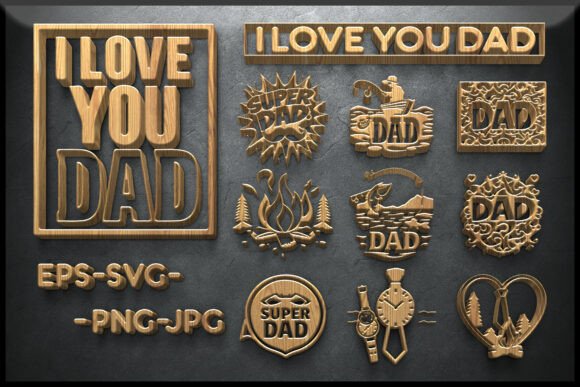
For creators, small business owners, and hobbyists, the right design assets can make a significant difference in both project outcomes and customer satisfaction. The Father’s Day Bundle offers a curated collection of 10 laser-cut vector designs centered around DAD and I LOVE YOU DAD themes. These files are specifically crafted for versatility across multiple mediums, including wood, acrylic, paper, and CNC projects. Whether you're preparing for a seasonal product launch or crafting a heartfelt gift, this bundle provides a foundation that integrates seamlessly into your creative or commercial workflow.
Understanding the Father’s Day Bundle
The Father’s Day Bundle includes scalable EPS and SVG files for laser and CNC cutting, high-resolution PNGs with transparent backgrounds, and JPG previews for quick visual reference. Each design is artboard-ready at 4500×5400 px or can be customized to fit your machine specifications. Themes include camping, fishing, and superhero-inspired motifs, making it ideal for a wide range of gift ideas and home decor applications.
At its core, this bundle is more than just a set of design files—it’s a resource that fits into the broader creative process, from ideation to final production. Whether you're a small business owner looking to expand your product line or a DIY enthusiast crafting a personalized keepsake, these designs provide a starting point that can be customized and adapted to suit your specific needs.
Integration Into Your Creative Workflow
One of the most effective ways to use the Father’s Day Bundle is as part of a structured creative process. Consider how it might fit into different stages of your workflow:
- Preparation: Use the included SVG and EPS files to test layout and alignment before cutting. This helps minimize material waste and ensures precision.
- Execution: Import the files directly into your laser cutter or CNC software. The scalable nature of vector files ensures sharp, clean cuts regardless of size.
- Presentation: The included mockups allow you to visualize how the final product will look in different contexts—perfect for product listings or client presentations.
For example, if you run an online store selling personalized wooden signs, you could use the camping-themed design from the bundle to create a limited-time Father’s Day collection. By importing the SVG file into your laser cutting software, you can quickly generate production-ready templates. The PNG and JPG previews help you create accurate product images for your website, while the mockups allow you to present the design in a lifestyle context, such as a framed wall sign in a rustic living room setting.
Compatibility and Customization
Design flexibility is a key strength of the Father’s Day Bundle. The vector-based EPS and SVG formats are compatible with most design and cutting software, including Adobe Illustrator, Cricut Design Space, Silhouette Studio, and Glowforge. This compatibility ensures that you can integrate these designs into your existing toolchain without needing additional software or conversion steps.
Customization is equally straightforward. You can easily adjust the size, color, and layout of the designs to match your project requirements. For instance, if you're creating a set of acrylic keychains with a fishing theme, you can scale down the design and add personalized text using your preferred design software. If you're working with wood, you might choose to enhance the contrast by painting certain elements or applying a stain to highlight the laser-cut details.
Practical Applications Across Industries
The versatility of the Father’s Day Bundle makes it applicable across a range of industries and use cases:
- Retail and E-commerce: Expand your seasonal product offerings with ready-to-cut designs for wall art, signs, and personalized gifts.
- Education: Teachers and educators can use the designs to create classroom decorations, student gifts, or interactive learning tools.
- Marketing: Use the designs in promotional materials, such as banners, social media graphics, or event signage.
- Hobbyists: Create custom cards, home decor, or personalized keepsakes for Father’s Day celebrations.
For small business owners, integrating the bundle into your workflow can help streamline production and reduce design time. Instead of starting from scratch, you can leverage the pre-designed templates and modify them to align with your brand or customer preferences. This not only improves efficiency but also maintains a consistent visual identity across your product line.
Organization and Long-Term Use
Effective asset management is crucial for long-term usability. When working with the Father’s Day Bundle, it's a good practice to organize the files by format and theme. For example, keep all SVG files in one folder, PNG previews in another, and mockups in a third. This structure makes it easier to locate the right file when starting a new project.
Additionally, consider creating a naming convention that reflects the design theme and intended use. For instance, “camping-dad-sign.svg” or “fishing-dad-keychain.png” can help you quickly identify the right file without opening each one individually. If you're working in a team environment, sharing a standardized file structure ensures consistency and reduces the learning curve for new team members.
Quality Control and Output Optimization
While the Father’s Day Bundle provides high-quality files out of the box, it's still important to verify the design before production. Always perform a test cut on a scrap material to ensure alignment, depth, and overall quality. This step helps identify any potential issues, such as overlapping lines or incorrect layer settings, before committing to your final material.
For laser cutting, check the power and speed settings based on the material you're using. Wood and acrylic, for example, require different settings to achieve clean cuts without burning or charring. If you're printing the designs for physical cards or invitations, ensure the color profile matches your printer’s specifications to avoid color discrepancies.
Maximizing the Bonus Mockups
The included mockups are a valuable addition to the Father’s Day Bundle, especially for those in product design, marketing, or e-commerce. These mockups allow you to showcase your designs in realistic settings without the need for professional photography. Whether you're creating a product listing or presenting a concept to a client, mockups help visualize the end result and improve the perceived value of your work.
To get the most out of the mockups, use them as part of your pre-production planning. Insert your design into the mockup file using smart layers in Photoshop, and generate visuals that reflect different use cases. For example, you can show the same design applied to a wooden plaque, a canvas print, and a personalized mug. This variety helps potential customers or stakeholders understand the design’s adaptability and encourages them to make a purchase or approve the concept.
Conclusion
The Father’s Day Bundle is more than a seasonal design collection—it’s a practical resource that supports creative and commercial workflows. From laser cutting and CNC routing to digital marketing and product design, this bundle offers a foundation that can be customized, scaled, and integrated into various projects. By understanding how to incorporate these files into your existing process, you can enhance efficiency, maintain quality, and deliver meaningful, personalized results that resonate with your audience or loved ones.